Control Depth, Blending, and Transparency
Choose the rendering state for overlapping geometry, transparent visuals, and depth-based visual cues.
At a glance
- Status: Depth testing and source-over blending are supported; OIT/depth techniques have narrower backend coverage.
- Languages: C-first; Python exposes the same generated visual/figure state calls.
- Prerequisites: Deliberate opaque/transparent grouping, meaningful alpha, and a valid camera/depth range.
- Result: Opaque geometry occludes correctly and transparent geometry uses an explicit approximation or technique.
Use this when
- 3D objects should occlude each other correctly.
- A visual has meaningful alpha values and must blend with the scene.
- Dense or translucent geometry looks wrong because draw order matters.
- Depth variation is hard to read and needs depth cueing, SSAO, or another depth technique.
- A browser target needs a status check before using an advanced rendering technique.
Minimal sequence
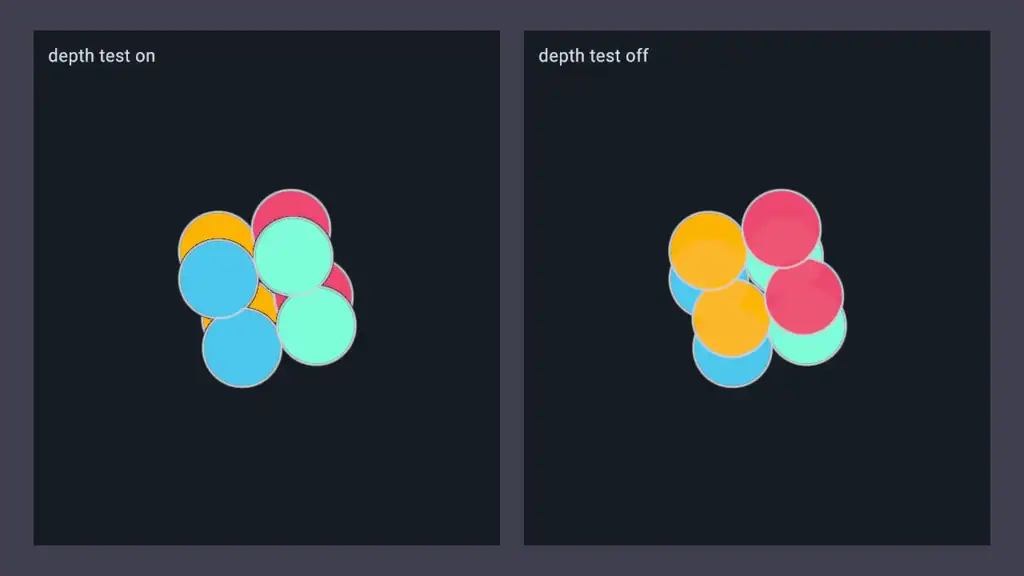
Start with an opaque scene. Enable depth testing on 3D visuals that should participate in scene occlusion.
dvz_visual_set_depth_test(visual, true);
Only then add transparency to the visuals that actually need it.
dvz_visual_set_data(visual, "color", rgba, n);
dvz_visual_set_alpha_mode(visual, DVZ_ALPHA_BLENDED);
Use alpha blending only when the color data carries useful alpha. Keep technique state on the visual that needs it instead of changing unrelated scene state.
These are C setup excerpts. Check setter results and validate the final result from multiple camera angles; one static viewpoint can hide order-dependent transparency errors.
Choose a technique
| Goal | Use | Notes |
|---|---|---|
| Ordinary opaque 3D geometry | dvz_visual_set_depth_test(visual, true) with the default opaque alpha mode |
Best default for mesh, primitive, sphere, point, and pixel visuals in 3D. |
| Screen-like overlays or diagnostics | dvz_visual_set_depth_test(visual, false) |
Useful for overlays; avoid using it to hide an ordering bug in 3D data. |
| Simple translucent visual | DVZ_ALPHA_BLENDED |
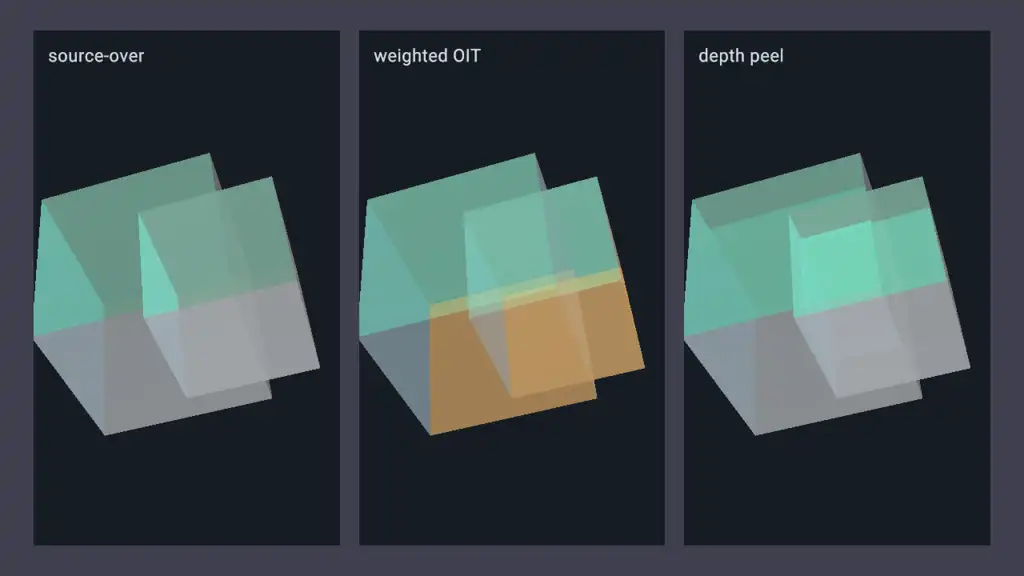
Source-over blending. Result can depend on draw order. |
| Many overlapping translucent items | DVZ_ALPHA_WBOIT |
Weighted blended order-independent transparency. More stable than source-over, but approximate. |
| Layered transparent surfaces | DVZ_ALPHA_DEPTH_PEEL |
More accurate order-independent transparency for layered surfaces; native path, higher cost. |
| Depth perception in dense 3D scenes | dvz_visual_set_depth_cue() |
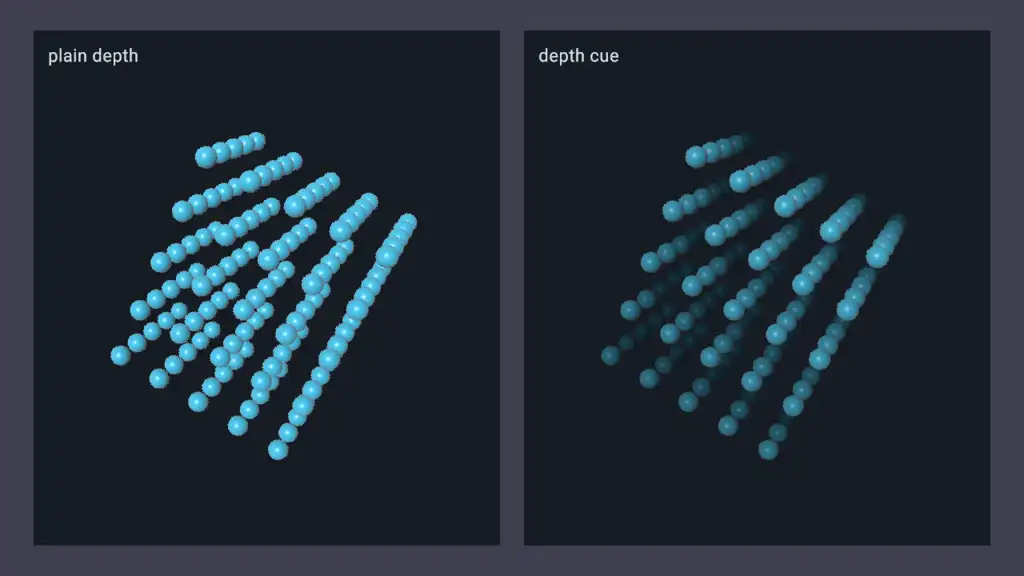
Fades or darkens by depth without changing geometry. |
| Jagged edges | MSAA example and panel/runtime sample settings | Antialiasing is separate from alpha correctness. |
Transparency rules
Transparent rendering is not just a color-alpha setting. Depth testing, alpha mode, and draw order interact:
- Opaque visuals should usually render first with depth testing enabled.
- Transparent visuals should usually keep depth testing enabled so opaque geometry can occlude them.
DVZ_ALPHA_BLENDEDdoes not sort your data for you; overlapping transparent objects may still need a different technique.DVZ_ALPHA_WBOITandDVZ_ALPHA_DEPTH_PEELuse specialized transparency passes. Check browser support before relying on them in WebGPU examples.- Text, labels, images, and some annotation helpers may configure alpha blending internally because their pixels naturally include transparent coverage.
Depth cue
Depth cueing is a visual perception aid, not a camera or clipping change. It is supported on point, pixel, primitive, mesh, and sphere visuals.
DvzDepthCueDesc cue = dvz_depth_cue_desc();
cue.near_depth = 0.10f;
cue.far_depth = 0.90f;
dvz_visual_set_depth_cue(visual, &cue);
near_depth and far_depth use the descriptor metric, where lower values are closer. The default
metric is normalized clip depth after the scene transform. Pass NULL to
dvz_visual_set_depth_cue() to disable depth cueing.
Color pipeline
Datoviz treats authored RGBA colors as display/sRGB semantic colors. The default figure color
pipeline, DVZ_COLOR_PIPELINE_LINEAR_SRGB, converts RGB to linear values before scene arithmetic,
blends alpha in linear color space, and encodes display targets back to sRGB for capture or
presentation.
Use DVZ_COLOR_PIPELINE_LEGACY_SRGB_BLEND only when an application needs compatibility with
renderers that blend RGB directly in display/sRGB values, such as Matplotlib/Agg comparison images.
In that mode Datoviz skips the linear intermediate and final display encode for UNORM external
targets, and semantic RGB colors are passed through unchanged in shaders. Alpha remains linear.
dvz_figure_set_color_pipeline(figure, DVZ_COLOR_PIPELINE_LEGACY_SRGB_BLEND);
The setting is figure-wide for app and offscreen rendering. Select it before rendering the first frame so Datoviz prepares the intended rendering path.
Browser support
The native path is the reference for advanced transparency techniques. Check the WebGPU subset and the relevant gallery page before choosing a technique for the experimental browser path.
Complete examples
- Depth Test Toggle - compare overlapping
3D points with depth testing on and off. Source:
examples/c/features/technique_depth_test.c. - Alpha Blending - ordinary source-over alpha
blending. Source:
examples/c/features/alpha_blending.c. - Transparency Order - compare
source-over, WBOIT, and depth-peel transparency on overlapping cubes. Source:
examples/c/features/technique_transparency.c. - Depth Cue - depth-dependent fading on a
3D sphere lattice. Source:
examples/c/features/technique_depth_cue.c. - Multisample Antialiasing - use MSAA for edge
quality. Source:
examples/c/features/technique_msaa.c.
Important details
- Depth testing is per visual in the retained scene API. Do not solve one visual's ordering issue by disabling depth everywhere.
- Transparent visuals can still be hidden by opaque depth. That is usually correct.
- Picking and probing follow rendered visibility rules. A visual hidden by depth state may also be absent from the expected query result.
- Volume, SSAO, EDL, and other depth-based techniques have their own examples and status. Do not assume a technique is portable just because the visual family is portable.
Common mistakes
- Disabling depth globally to fix one transparent visual.
- Assuming alpha values change draw order automatically.
- Using
DVZ_ALPHA_BLENDEDfor many interpenetrating translucent objects and expecting exact order-independent results. - Turning off depth testing for labels or overlays without checking whether they should be occluded by 3D geometry.
- Copying deferred or native-only technique code into a WebGPU target without checking status.