Use Lighting and Materials
Make 3D surfaces readable with normals, material attributes, and lights.
At a glance
- Status: Supported mesh/primitive/sphere material workflows; advanced parity is backend-dependent.
- Languages: C-first; Python exposes the exact descriptor and visual setter calls.
- Prerequisites: Valid geometry, outward normals where required, a 3D camera, and depth testing.
- Result: Surface orientation is visible through consistent diffuse/specular or standard material shading.
Task workflow
Choose a visual family that supports material parameters, provide the geometry attributes required by that family, set a material descriptor, and verify depth testing with a 3D camera or controller. Use the gallery examples for complete runnable programs.
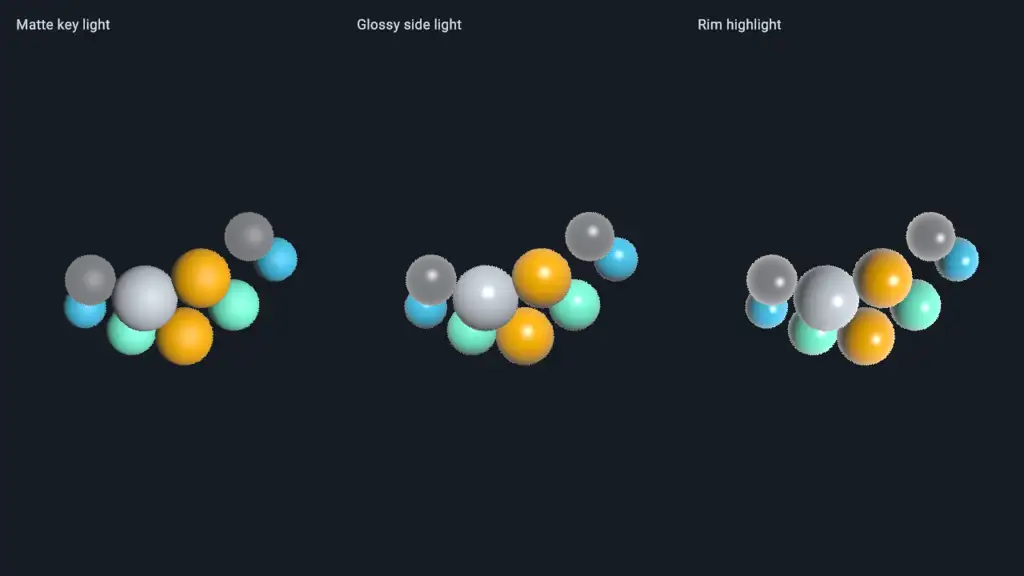
dvz_visual_set_material() applies shared surface material parameters to primitive, mesh, and
sphere visuals. It is not a general style setter for every visual family.
| Visual family | Lighting input | Typical use |
|---|---|---|
| Mesh | position, usually normal, optional color, index, texcoords, texture |
Imported or generated triangle surfaces. |
| Primitive | position, optional normal, color, index |
Low-level indexed or non-indexed geometry. |
| Sphere | position, radius, color; use DVZ_SPHERE_FLAGS_LIGHTING |
Many lit sphere impostors without mesh vertices. |
Choose a material model
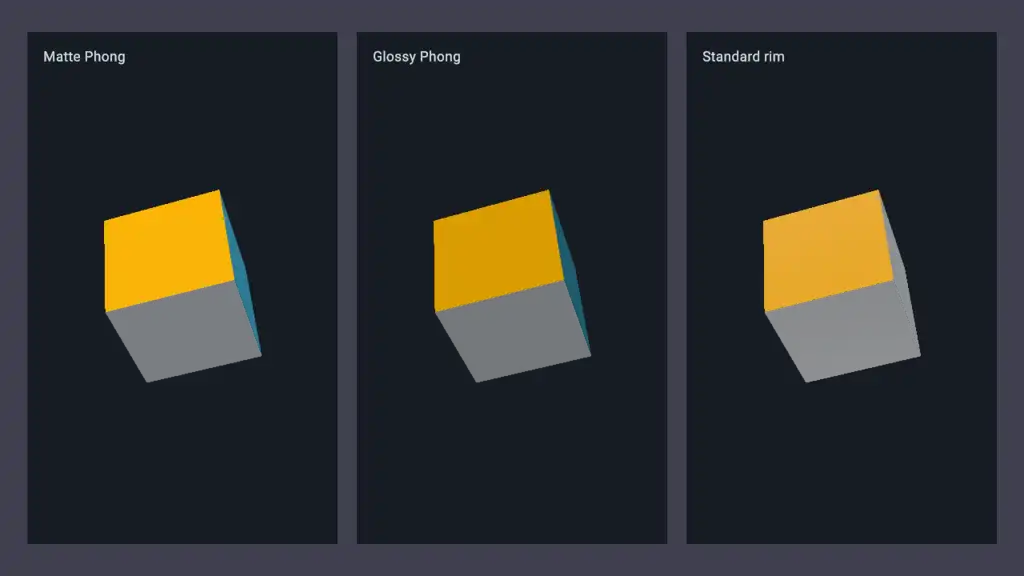
Start from one of the descriptor helpers, then override only the fields that matter:
| Helper | Model | Main controls |
|---|---|---|
dvz_material_desc() |
Phong default | Ambient, diffuse, specular, shininess. |
dvz_phong_material_desc() |
Phong | Direct control over classic ADS lighting. |
dvz_standard_material_desc() |
Standard | Roughness, specular strength, metallic, emissive, rim strength. |
All material descriptors also include opacity, alpha_mode, base_color_factor, and
light_direction. Pass NULL to dvz_visual_set_material() to restore default material
parameters.
The current standard model is retained as standard material state, then lowered to the active shader payload. Treat it as the recommended route for roughness, metallic, emissive, and rim-style controls; use the Phong descriptor when you want direct ambient, diffuse, specular, and shininess tuning.
Mesh call sequence
Both code blocks are C setup excerpts. Check constructors and every upload/setter result; use the linked examples for geometry/index ownership and complete cleanup.
DvzVisual* mesh = dvz_mesh(scene, 0);
dvz_visual_set_data(mesh, "position", pos, vertex_count);
dvz_visual_set_data(mesh, "normal", normal, vertex_count);
dvz_visual_set_data(mesh, "color", color, vertex_count);

DvzMaterialDesc material = dvz_standard_material_desc();
material.light_direction[0] = -0.45f;
material.light_direction[1] = +0.35f;
material.light_direction[2] = +0.82f;
material.standard.roughness = 0.62f;
material.standard.specular = 0.34f;
material.standard.rim_strength = 0.10f;
dvz_visual_set_material(mesh, &material);
dvz_visual_set_depth_test(mesh, true);

dvz_panel_add_visual(panel, mesh, NULL);
For indexed meshes, also upload the index buffer with the mesh API used by the canonical mesh example. For textured meshes, bind texture coordinates and the sampled field before relying on material lighting.
Sphere call sequence
DvzVisual* spheres = dvz_sphere(scene, DVZ_SPHERE_FLAGS_LIGHTING);
dvz_sphere_set_mode(spheres, DVZ_SPHERE_MODE_RAYCAST_IMPOSTOR);
dvz_visual_set_data(spheres, "position", position, sphere_count);
dvz_visual_set_data(spheres, "radius", radius, sphere_count);
dvz_visual_set_data(spheres, "color", color, sphere_count);

DvzMaterialDesc material = dvz_standard_material_desc();
material.standard.roughness = 0.42f;
material.standard.specular = 0.60f;
material.standard.rim_strength = 0.18f;
dvz_visual_set_material(spheres, &material);

dvz_panel_add_visual(panel, spheres, NULL);
Sphere impostors compute their surface normal in the sphere shader path, so they do not need an
uploaded normal attribute. Mesh and primitive surfaces usually do.
Material descriptors are copied into retained visual state. Geometry and attribute uploads follow their documented copy rules; the scene owns the visual after construction.
Important details
- Normals must be in the same coordinate space as positions. If a mesh is transformed, generated, or imported from another tool, verify that normals were transformed consistently.
- Face winding affects what you see when culling or indexed geometry is involved. If lighting looks inverted or faces disappear, check triangle order before changing material values.
- Scale matters. Very large or very small geometry can make camera near/far planes, depth testing, and specular highlights look wrong.
- Depth testing should usually be enabled for opaque lit surfaces. Combine lighting, alpha, and transparency deliberately; transparent surfaces follow a different rendering path than opaque material surfaces.
light_directionis a direction vector used by the material shader. Keep it finite and non-zero; normalize it yourself if you need predictable cross-example comparisons.- WebGPU support covers the promoted material and lighting gallery routes, but advanced material behavior should still be checked against the current backend status before relying on parity.
Debug checklist
When a lit surface looks flat, black, inverted, or unexpectedly glossy, check in this order:
- The visual family supports material parameters.
- Required attributes were uploaded with the correct item count.
- Mesh or primitive normals exist, point outward, and match the geometry transform.
- Indexed triangles have the expected winding.
- The camera near/far range encloses the geometry and depth testing is enabled for opaque surfaces.
- The material model matches the fields being edited. Phong fields do not tune standard material roughness, and standard fields do not tune Phong shininess.
- Alpha mode and opacity match the intended rendering path.
Common mistakes
- Debugging lighting before verifying face winding and normals.
- Editing
standard.*fields after creating a Phong descriptor, or editingphong.*fields after creating a standard descriptor. - Using transparency and expecting opaque material behavior.
- Reusing one mesh visual for objects that need different materials; split visuals when material state differs.
- Forgetting backend status differences for advanced material features.
Next steps
Complete and related examples
- Canonical complete example: Lighting - Source:
examples/c/features/lighting.c - Mesh Materials - Source:
examples/c/features/material_mesh.c - Textured Mesh - Source:
examples/c/features/mesh_texture.c